Agentic Studio
Designing pioneer marketer workflows through AI enablement
Role
Product Designer
Timeline
August 2025 - January 2026

Executive Summary
Sitecore Agentic Studio was the productisation of rapid, experimental AI work emerging from Sitecore AI Innovation Labs into a scalable, enterprise-ready platform. Its goal was to enable AI agents, flows, and a universal chat experience that could be embedded across SitecoreAI without slowing down complex marketer workflows or locking the product into brittle UI patterns.
As the Product Designer, I was responsible for translating fast-moving, demo-driven Innovation Labs concepts into production-ready experiences that could scale across unknown future agentic use cases. The core challenge was not just visual design, but systems design: creating UI structures that could support non-linear workflows, deep customisation, collaboration, and governance while still offering the familiarity and speed of chat.
This case study focuses on three intertwined problems:
- Designing scalable, highly customisable UIs for agents and flows
- Integrating chat as a first-class but non-dominant interaction model
- Bridging experimentation and enterprise readiness through cross-team communication
Context & Problem Space
Company & Product Context
Agentic Studio was the bridge between Sitecore AI Innovation Labs and SitecoreAI, forming the foundation for how AI would be delivered across the product suite. Strategically, this work supported Sitecore's shift from a composable product portfolio to a consolidated AI-first platform, in response to increasing competitive pressure.
Agentic Studio introduced:
- AI agents and flows that could be configured and reused
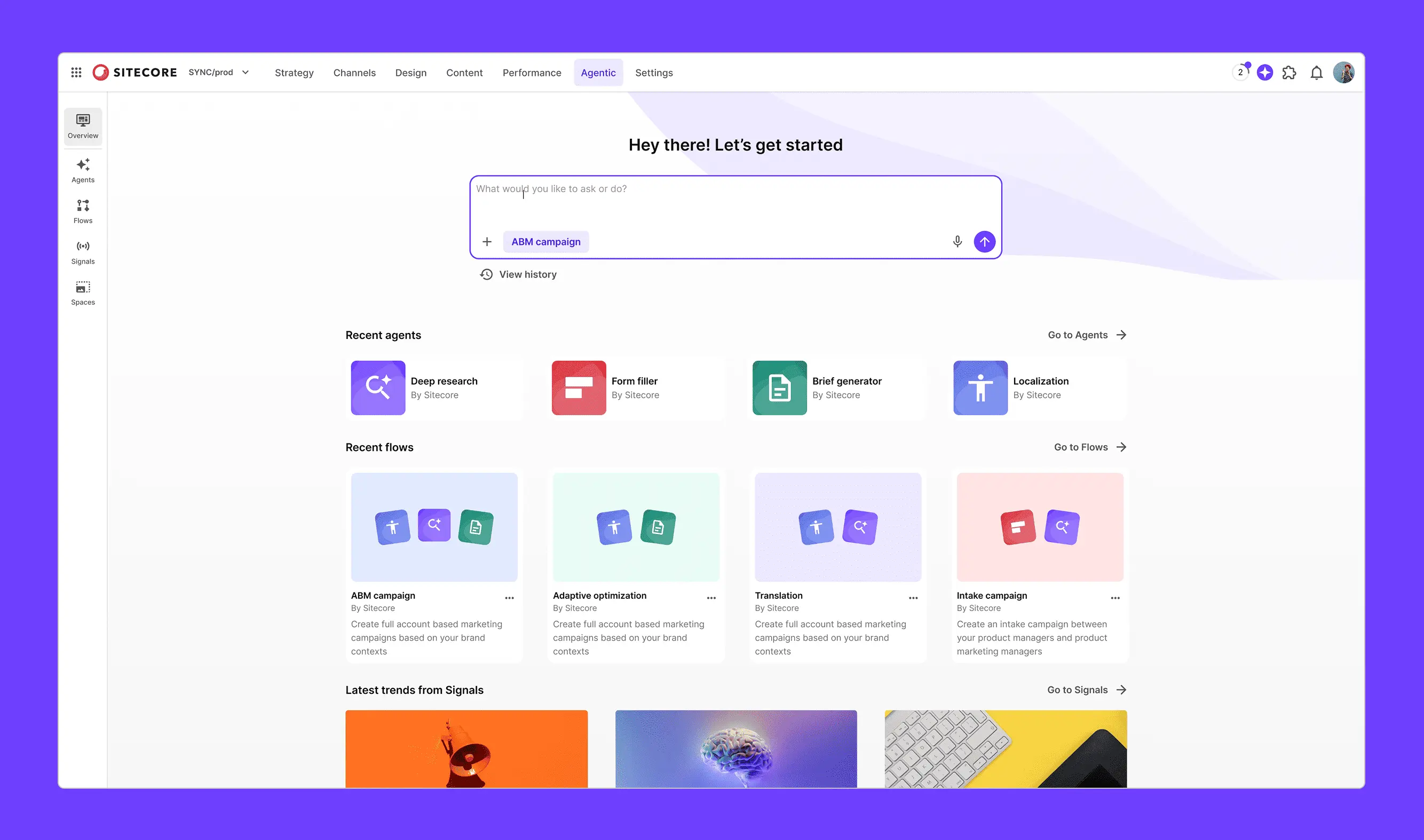
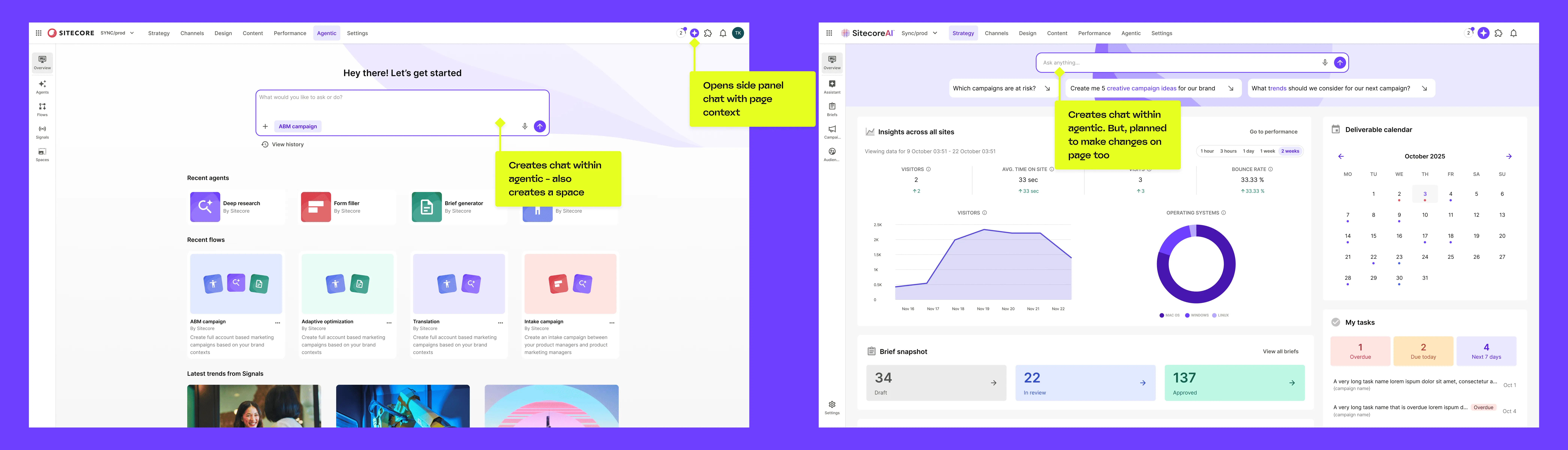
- A universal chat experience accessible from anywhere in SitecoreAI
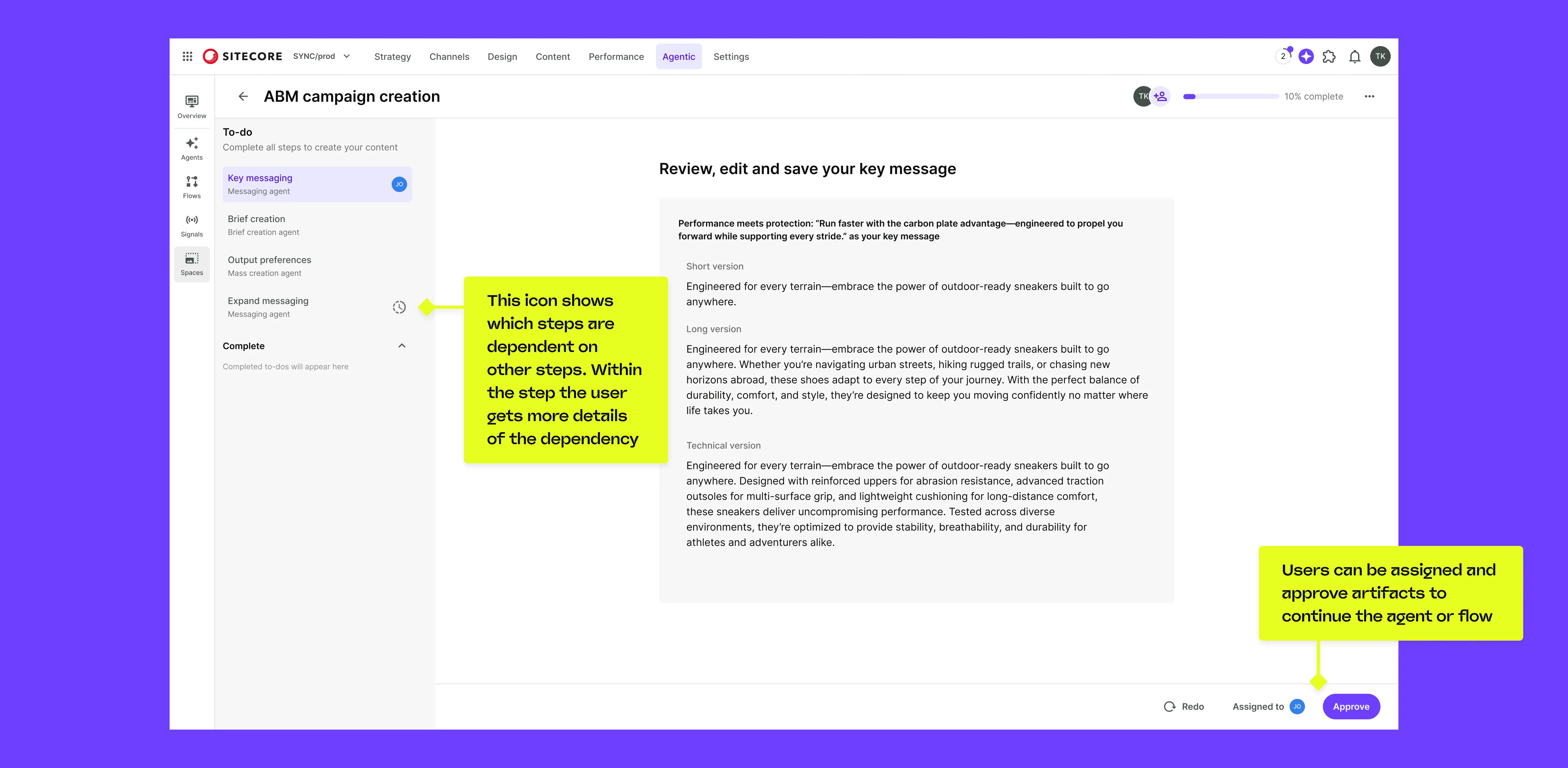
- Purpose-built UIs for agentic workflows beyond chat
Agents and flows could be triggered from dashboards, managed centrally in the Agentic area, or interacted with through chat, creating a uniquely complex set of touchpoints.
Why This Was Not a "Normal" Design Project
This was not a single feature, but a new product surface being embedded into an existing enterprise ecosystem. The project faced extreme ambiguity due to the pace of AI innovation, with a constant inflow of new requirements from customers and industry changes. We worked under tight timelines (approximately three months to early customer access), and I collaborated directly with a VP who was also the primary engineer. Design decisions had long-term architectural implications, often affecting how all future AI features would be built.
My Role in Practice
Officially, my role was Product Designer. In practice, I:
- Designed all Agentic Studio and chat experiences in Figma or prototyped them using code
- Led interaction and systems thinking for agents, flows, and chat
- Conducted competitor and industry research (e.g. Opal, Google and Microsoft AI tooling)
- Acted as the design bridge between Innovation Labs and SitecoreAI
- Owned handover quality, design sign-off, and implementation reviews
I worked most closely with the VP of AI & Innovation, my Design Lead, and Product Design Manager. Decision-making was highly collaborative but fast. I often had to propose a direction based on previous knowledge from Innovation Labs, test it quickly through design, and use that artefact to drive alignment.
Core UX Problems
Rather than framing this as a list of features, the work revolved around several fundamental UX problems.
1. How Do You Represent Agents and Flows?
Early on, we struggled with a binary choice: chat or custom UI. Chat offered speed and flexibility, but broke down for complex, non-linear workflows. Custom UIs offered clarity, but risked being brittle and expensive to maintain.
The key insight was that we did not need to choose.
By designing from small UI modules mapped to agent and flow configurations, we could:
- Render the same agent in chat or full UI
- Avoid duplicating logic
- Support future, unknown configurations without rebuilding UIs
2. How Do You Handle Non-Linear Workflows?
Unlike chat, agent workflows are not inherently linear. Users could:
- Skip steps
- Return later
- Collaborate asynchronously
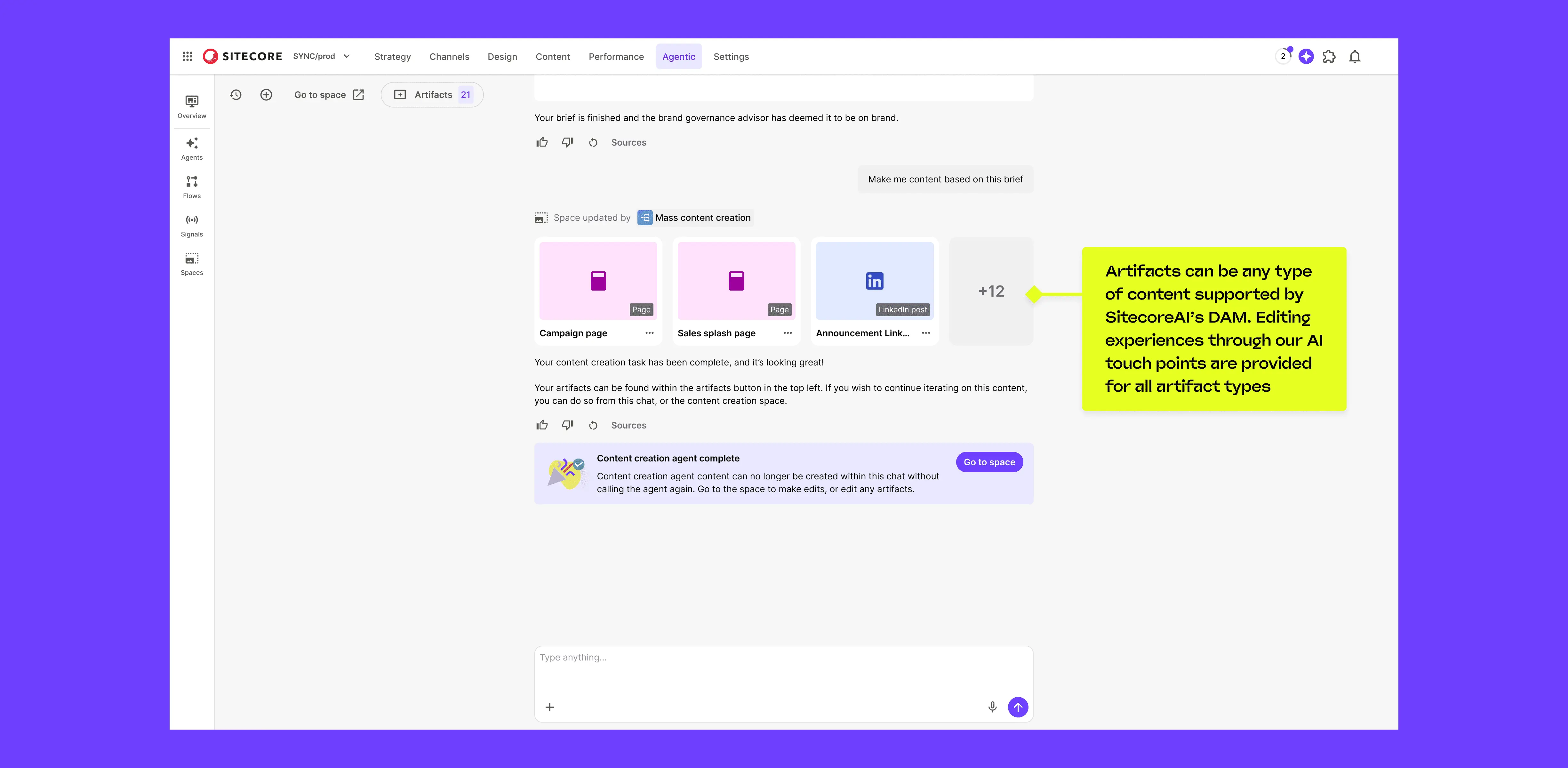
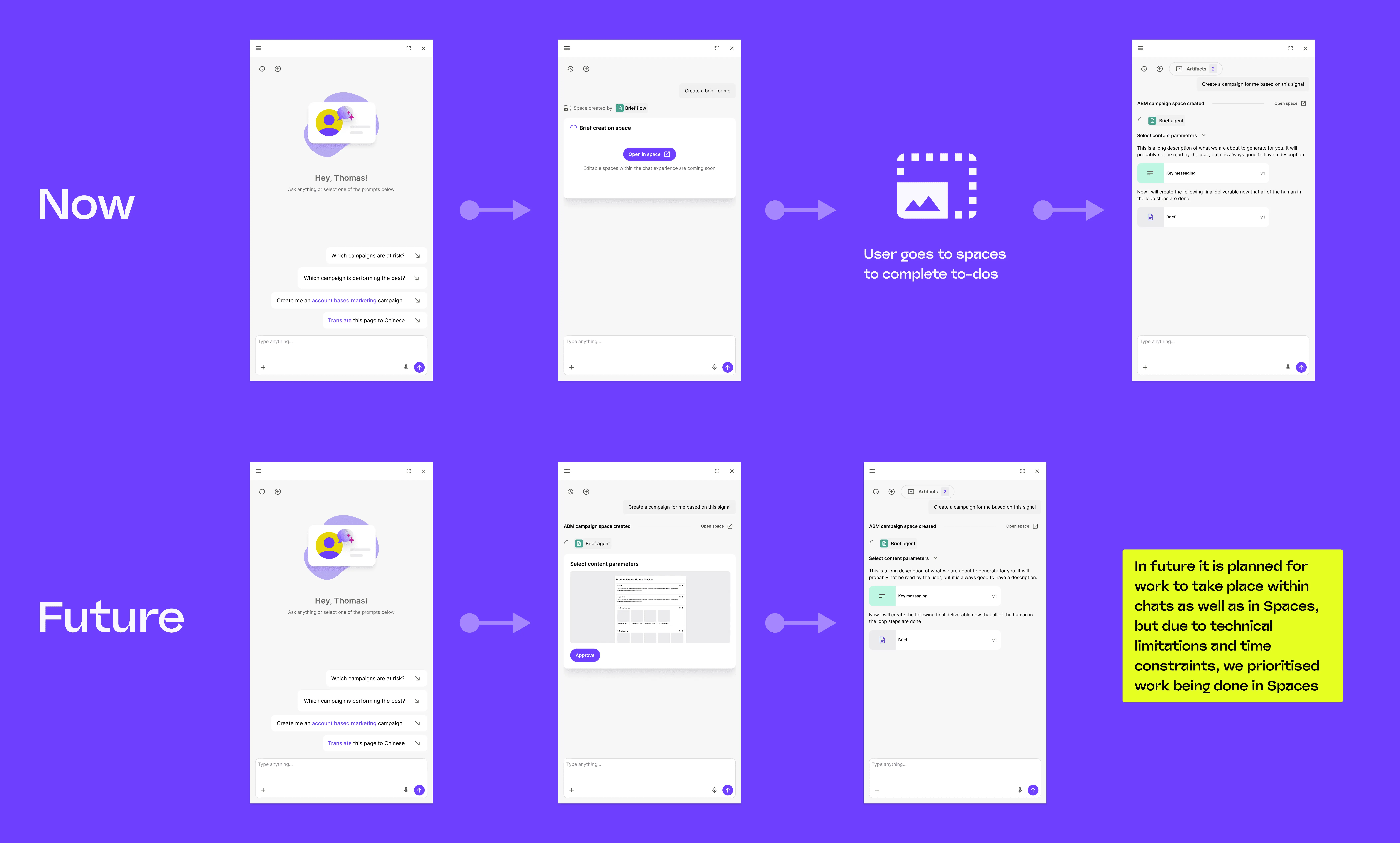
A purely chat-based model created temporal problems and broke mental models. We addressed this by introducing Spaces, an abstraction layer where:
- Chat remained linear and familiar
- Full agent UIs could be non-linear
- Collaboration, reviews, and history lived outside chat
This preserved the simplicity of chat while enabling enterprise workflows.

3. How Do You Represent Enterprise Content?
Sitecore users work with structured content types (sites, collections, media), not just text. Traditional AI chats do not handle this well.
We introduced Artifacts: a flexible abstraction capable of representing any generated content type with tailored editing experiences. Artifacts could be grouped, reviewed, and approved consistently, then promoted into SitecoreAI as first-class content.

Why Traditional Patterns Failed
Standard workflow and chat patterns broke down under:
- Non-linear temporality
- Role-based permissions and visibility
- Parallel agent execution
- High output volume (hundreds of artifacts)
Relying solely on chat would have created an opaque, fragile system that slowed users down. The solution required combining chat familiarity with explicit, purpose-built interfaces.
Design Principles
Design for UI first, translate to chat later
Optimal workflows should not be constrained by chat metaphors.
Atomic over bespoke
Components must scale combinatorially without UI rewrites.
Linear chat, non-linear spaces
Preserve mental models while enabling complexity.
Progressive disclosure
Reduce cognitive load when dealing with high output volume.
Designing for Scalability & Customisation
Early Mental Models and Why They Changed
Initially, agents and flows were treated as the same concept. This broke down once we introduced collaboration and handovers. A flow could orchestrate agents; an agent could not contain other agents. While technical, this distinction had real UX consequences, especially in builder experiences.
Managing Customisation Risk
Every customisation option multiplied design and technical debt. To control this, we:
- Designed from atomic components
- Created shared status signifiers and states
- Avoided one-off UI variants
This allowed us to support complex configurations without exponential complexity.
Delivering the Chat Experience
Why Chat Was Essential
Chat was not a nice-to-have. It provided:
- A safe baseline for unknown future use cases
- A way for users to add rich context beyond forms
- Familiarity in a fast-moving AI landscape
Embedding Chat into an Enterprise Product
We designed:
- A universal chat, accessible via the top navigation
- A contextual prompt bar, scoped to Agentic work
Key decisions included:
- Push-in side panel vs overlay
- Undocking chat on builder pages
- Redirecting actionable work into Spaces for review
This prevented chat from becoming a black box while preserving traceability and collaboration.

Cross-Team Communication & Influence
A major part of my role was translating between two modes of working:
Innovation Labs
Rapid, demo-driven, minimal constraints
Core Product
Governed, consistent, enterprise-ready
To align teams, I relied heavily on:
- Interactive prototypes for narrative alignment
- Annotated handovers with walkthrough videos
- Follow-up sessions to surface ambiguity early
Pushback, especially from product leadership, was common and healthy. Decisions around chat and agent interaction patterns had platform-wide implications, requiring clear rationale and iteration.
Outcomes & Impact
Product Impact
Established Agentic Studio as the foundation for AI across SitecoreAI
Enabled customers to build and scale their own AI agents
Early partners built 100+ agents within weeks of release
Organisational Impact
Centralised AI ownership within Agentic
Reduced duplicated AI efforts across product teams
Created a reusable system for future AI features
Trade-offs Accepted
Prioritised UI-based workflows over refining chat for initial release
Accepted that chat required further iteration post-launch
Reflection
This project reinforced several lessons:
- Designing AI systems means designing for uncertainty
- Technical constraints should follow user flows, not the reverse
- Simplicity is harder than complexity, especially in AI
If starting again, I would invest earlier in identifying the most common agent use cases to ground atomic design decisions in concrete scenarios.
This project demonstrates my ability to design scalable systems under extreme ambiguity, translate experimental AI concepts into enterprise UX, and influence cross-functional teams through design thinking. It actively challenges the misconception that AI UX is just chat, and shows how thoughtful systems design can unlock AI's real value in complex products.